I am building Hearthroot, a medieval idle browser MMORPG.
I was meant to be working on the world map and lore.
Instead, I built a map editor.
At first, that felt like procrastination. It was the kind of work that looks productive enough to be suspicious. I was not writing town histories, region names, quest hooks, trade routes, or faction boundaries. I was building a tool.
But the more I worked on it, the more obvious it became: for this kind of game, the tool is part of the product.
A static map helps me ship one version of the world.
A map editor helps me keep changing it.
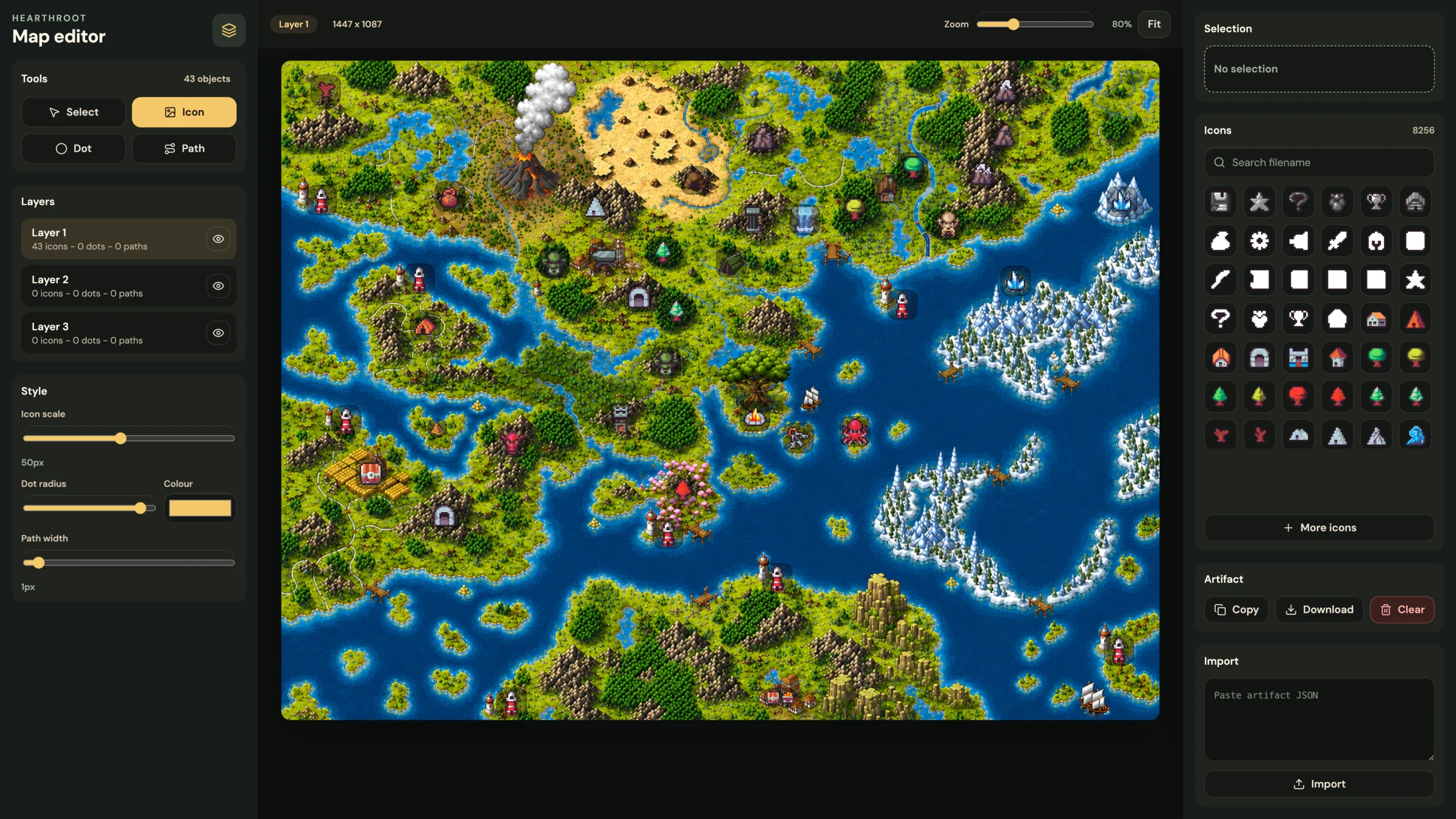
The thing I was supposed to build
The original task sounded simple:
- take the world map image
- place important locations on it
- add icons
- mark paths, points of interest, and travel routes
- use it later inside the game
That is the normal path. Open an image editor, place some icons, export a pretty screenshot, write lore around it, and call it a world map.
The problem is that a browser MMORPG world is not just a picture.
It changes.
Locations get renamed. Resources move. Balance changes. New towns appear. Some routes become important. Some routes become dead. The lore shifts as the actual game starts producing constraints.
If every world change requires me to repaint a flattened image and then manually keep the game data in sync, the map becomes friction.
That pushed me towards a different output: a map I could edit visually, but treat as data everywhere else.
The detour
The editor started with three inputs:
- the actual world map image
- a folder of 32x32 pixel icons
- the need to export something the game client can use later
That last part is the important one. The editor is not meant to be the final public map. It is a production tool.
The design question changed from "how do I make this map look finished?" to "what does the game need to recreate this map later?"
The answer is not just image positions. It is scale, layers, icon treatment, dot sizes, path styles, and coordinate rules.
Why a static map was the wrong output
The tempting output is an image.
Put icons on the map, export PNG, done.
That would be fast, but it would also make every future change manual.
The game does not only need to know that there is a marker somewhere. It needs to know what the marker is, where it is, what layer it belongs to, how big it should be, and whether it is a city, dungeon, route, resource, note, or future gameplay object.
Once that exists as data, I can do more useful things later:
- show and hide layers
- filter markers
- attach tooltips
- link locations to game entities
- rebalance travel paths
- render the same map in an admin tool and in the player client
- add search, hover states, and route previews
Because the marker data exists separately from the image, the map can become interactive later instead of being locked into whatever I exported that day.
Input: map plus icons
The base map is a large image, currently just a file in the project:
/map/map.webpThe icons live separately:
/map/32x32/That matters because the editor can treat icons as selectable assets instead of baked-in pixels.
I can pick an icon, place it on the map, move it, resize it, and assign it to a layer. If an icon changes later, the data can still point to the asset path instead of requiring every marker to be redrawn by hand.
The map itself is bright and visually busy, so icons also need help standing out. A raw 32x32 icon can disappear on top of forests, mountains, rivers, and coastlines.
That led to a small but important editor control: the icon backing.
Some markers need a dark plate. Some need a softer halo. Some should have no backing at all. It sounds like a visual detail, but it is still part of the map data because the final renderer needs to know how to draw that marker.
Layers make the map usable
The editor has three layers.
That is not because three is magical. It is because map data becomes easier to reason about when different kinds of information are not all smashed together.
For example:
- one layer can hold permanent world locations
- one layer can hold gameplay markers
- one layer can hold notes, routes, experiments, or temporary planning
The exact meaning can evolve, but the structure is useful immediately.
When I am building the world, I do not want every experimental path or temporary dot to become a permanent location. Layers let me separate "this is canon" from "this is useful while designing".
That is a small tooling decision, but it protects the world from becoming a messy artboard.
Dots and dotted paths
Not every map object should be an icon.
Sometimes I just need a small point.
Sometimes I need a dotted route.
This is where the editor stopped being only an icon placer and became closer to a world annotation tool.
Dots are useful for tiny points of interest, possible node locations, spawn points, or anything that is not important enough to deserve a full icon yet.
Dotted paths are useful for movement, roads, borders, travel routes, quest trails, and vague connections between regions.
The small UX detail here is that the visible dot and the selectable area are not the same thing. I may want to draw a tiny 1px or 2px circle, but I still need to click it comfortably later. The editor can store the small visual radius while keeping a larger invisible hit target in the UI.
Again, tiny decision, big difference when the map starts filling up.
Output: an artefact for the game
The editor export is a JSON artefact the game can load.
Something shaped roughly like this:
{
  "map": {
    "imageSrc": "/map/map.webp",
    "width": 1447,
    "height": 1087,
    "coordinateSystem": "image-pixels",
    "leaflet": {
      "crs": "CRS.Simple",
      "bounds": [
        [0, 0],
        [1087, 1447]
      ]
    }
  },
  "layers": [
    {
      "id": "world",
      "markers": [
        {
          "iconSrc": "/map/32x32/town.png",
          "point": {
            "x": 742,
            "y": 415,
            "latLng": [415, 742],
            "normalised": {
              "x": 0.51279,
              "y": 0.38178
            }
          },
          "iconSize": [32, 32],
          "iconAnchor": [16, 16],
          "backdrop": "plate"
        }
      ],
      "dots": [],
      "paths": []
    }
  ]
}
The exact schema will keep evolving, but the principle is stable: save the facts needed to rebuild the map, then let each client decide how to render them.
Why Leaflet fits this
Leaflet is usually used for real maps, but it also works well for game maps when you treat the image as a simple coordinate plane.
With CRS.Simple, the map does not need latitude and longitude in the real-world sense. It can use image coordinates.
That means a point can be stored as:
{ "x": 742, "y": 415 }And rendered in Leaflet as:
const latLng = [415, 742]The order looks odd at first, but it is just Leaflet's [lat, lng] shape. For an image map, y becomes the Leaflet latitude and x becomes the Leaflet longitude.
This gives me useful map behaviour without building all of it myself:
- panning
- zooming
- layers
- markers
- popups
- image bounds
- predictable coordinate handling
The editor can stay focused on world-building, while Leaflet can handle the final in-game map viewer.
Why this matters for Hearthroot
Hearthroot is not trying to be a giant realtime 3D world. It is an idle browser MMORPG, so the world has a different job.
The map needs to make slow systems feel physical.
If a player is gathering ore, travelling between towns, crafting supplies, unlocking regions, or sending characters towards a dungeon, those actions should feel like they are happening somewhere. A good map gives idle timers a sense of distance, economy, and place.
That is why I want towns, roads, resources, and danger zones to become editable game objects early. The lore can grow around the parts of the world that actually survive contact with the game systems.
For Hearthroot, the map editor is not just content tooling. It is a way to let the world and the mechanics shape each other.
What changed
The funny part is that building the editor made the world clearer before I wrote much lore.
It forced better questions:
- what counts as a permanent place?
- what should be a marker versus a dot?
- which routes matter mechanically?
- which locations need player-facing names?
- what data should the map export?
- what should remain visual only?
That is why this did not end up feeling like procrastination.
It became a way to make world-building less vague. I can place ideas directly onto the map, test whether they make sense mechanically, and only then give them more narrative weight.
The map is not just decoration. It is part of the game's operating system.
The lesson
I still need to build the actual map.
I still need lore, names, regions, routes, and reasons for places to exist.
But now those decisions can land somewhere useful.
For a browser MMORPG, the world is not only art. It is infrastructure.
So instead of only making a map, I made the thing that lets me keep making the map.
Small detour.
Probably the right one.